
People counting for retail
People counting for retail stores
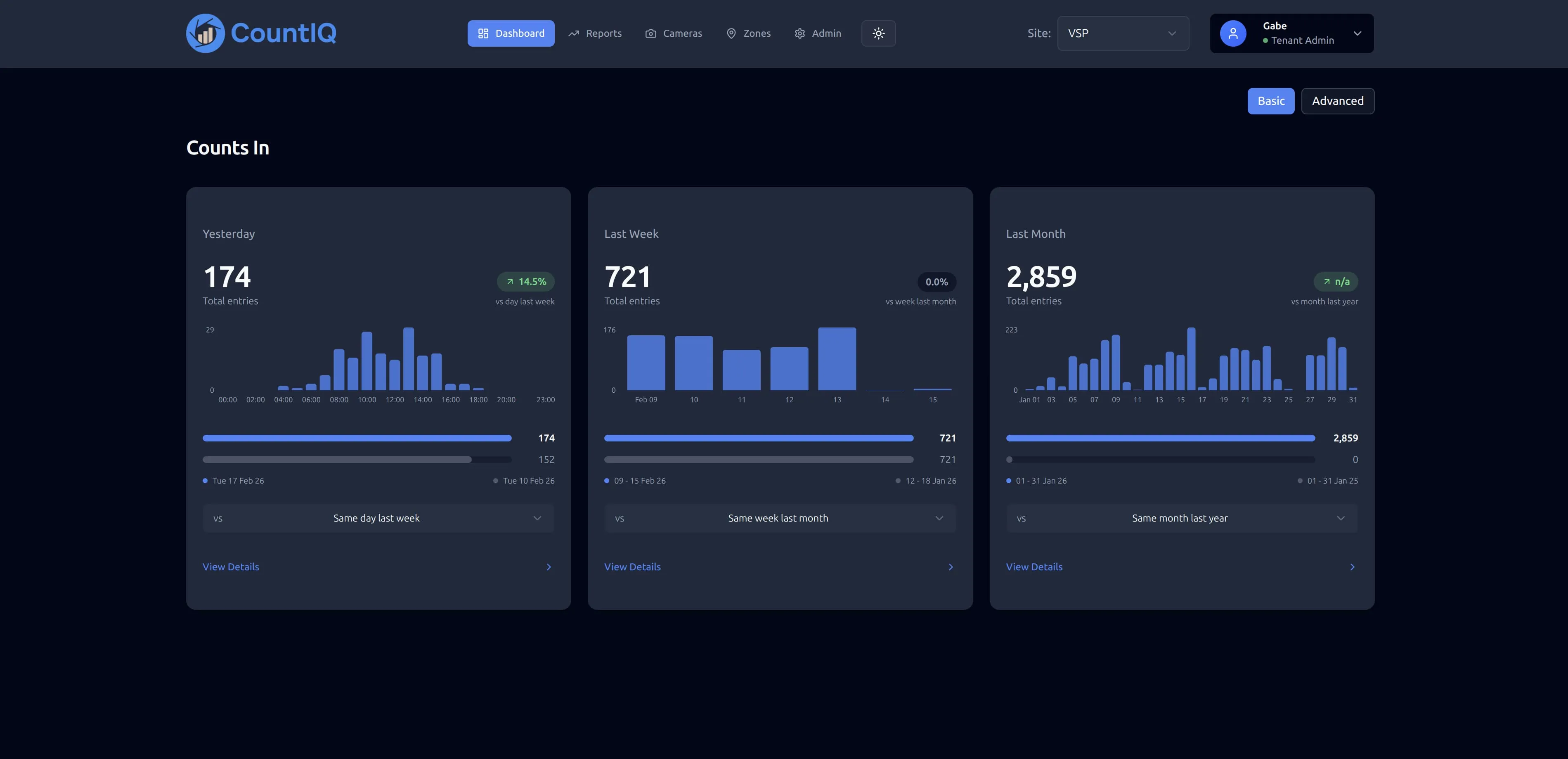
Retail people counting measures how many shoppers enter each store, hour by hour, so you can compare stores, roster to real demand and work out conversion. CountIQ does it with compatible Axis cameras at your entrances and brings every store into one cloud dashboard.
Why retailers count footfall
Footfall is the missing half of conversion
Sales figures tell you what was bought. Footfall tells you how many people had the chance to buy. Divide transactions by entries and you have a conversion rate you can compare between stores, days and campaigns.
Rosters built on actual traffic
Hourly entry counts show when each store is busy. Staff those hours on evidence instead of copying last year's roster.
A fair way to compare stores
Two stores with the same sales can have very different traffic. Counting shows whether a store has a traffic problem or a conversion problem, and those need different fixes.
What to measure
Five numbers cover most retail decisions. CountIQ supplies the traffic side; transaction counts come from your point-of-sale reports.
| Metric | What it tells you | Decision it supports |
|---|---|---|
| Entries per hour | When shoppers arrive | Rosters and opening hours |
| Footfall by day, week and month | How traffic is trending | Campaign and seasonal planning |
| Conversion rate (transactions ÷ entries) | How well a store turns visits into sales | Coaching, layout and range |
| Store-by-store comparison | Which locations are strong or weak on traffic | Marketing spend and lease reviews |
| Live occupancy | How many people are in store now | Floor cover and capacity limits |
How CountIQ counts
- Step 1
Count at the entrance
Compatible Axis cameras count people crossing configured entrance and exit lines. Detection and counting run on the camera.
- Step 2
Bring every site together
Count data is sent to CountIQ in the cloud, where dashboards show activity and occupancy by site and zone.
- Step 3
Alert and report
Set occupancy thresholds, receive alerts and schedule reports so the right people get the numbers without asking.
Read more about how people counting systems work or see the CountIQ people counting software in detail. Planning a purchase? See people counting pricing, Axis camera compatibility and privacy.
How retail teams use it
After a campaign
Compare footfall for the campaign week with the weeks before it, store by store, to see whether the campaign brought people through the door.
Monday reporting
Scheduled reports send last week's traffic to store and area managers, so nobody compiles a spreadsheet to find out how the weekend went.
Moving off AXIS Store Reporter
Axis ended service support for Store Reporter on 31 January 2026. CountIQ provides cloud dashboards and automated reporting for teams moving from it, on the Axis cameras already installed.
See the Axis Store Reporter replacementWhat to check before you start
- Every public entrance needs a camera that sees the full width of the doorway. An uncounted side door understates traffic.
- Cameras need to be compatible Axis models running AXIS People Counter or AXIS Object Analytics. We check your existing cameras and entrance coverage before you commit.
- Decide how to treat staff movements. Staff walking in and out inflate footfall unless they use a separate door or you allow for them in your analysis.
- Conversion needs transaction counts from your point of sale for the same hours. CountIQ provides the footfall side.
Common questions
What is a retail people counter?
A retail people counter records how many shoppers enter and leave a store. Older counters use an infrared beam across the doorway. Camera-based counters use on-camera analytics, which can tell direction and count several people who walk in together.
Can I use the cameras already in my stores?
If they are compatible Axis cameras positioned to see the entrance, CountIQ can use them for counting without separate people counter sensors. Some stores may need a camera repositioned, extra entrance coverage or network configuration. We assess that with you before rollout.
How do I calculate conversion rate from footfall?
Divide the number of transactions by the number of entries for the same period. A store with 120 transactions from 600 entries converted 20% of its visitors. CountIQ provides the entry counts; transaction counts come from your point-of-sale system.
Does CountIQ work across many stores?
Yes. CountIQ brings retail footfall counts together so you can compare stores, identify peak visitor hours and review daily, weekly and monthly traffic trends in one dashboard.
Where does the counting happen?
Detection and counting run locally on the camera using edge processing. Count data is sent to CountIQ in the cloud, where dashboards and reports are built. You should still cover people counting in your own privacy notice and store signage.
People counting for other spaces
People counting in the field
See how operations teams use CountIQ to turn the cameras they already have into reliable counts.

Ready to Start Your Automation Journey?
Our team is ready to discuss how our AI solutions can address your specific business challenges.
sales@ddilabs.ai
Location
Sydney, Melbourne, Brisbane