
Workplace occupancy monitoring
Workplace occupancy monitoring for offices
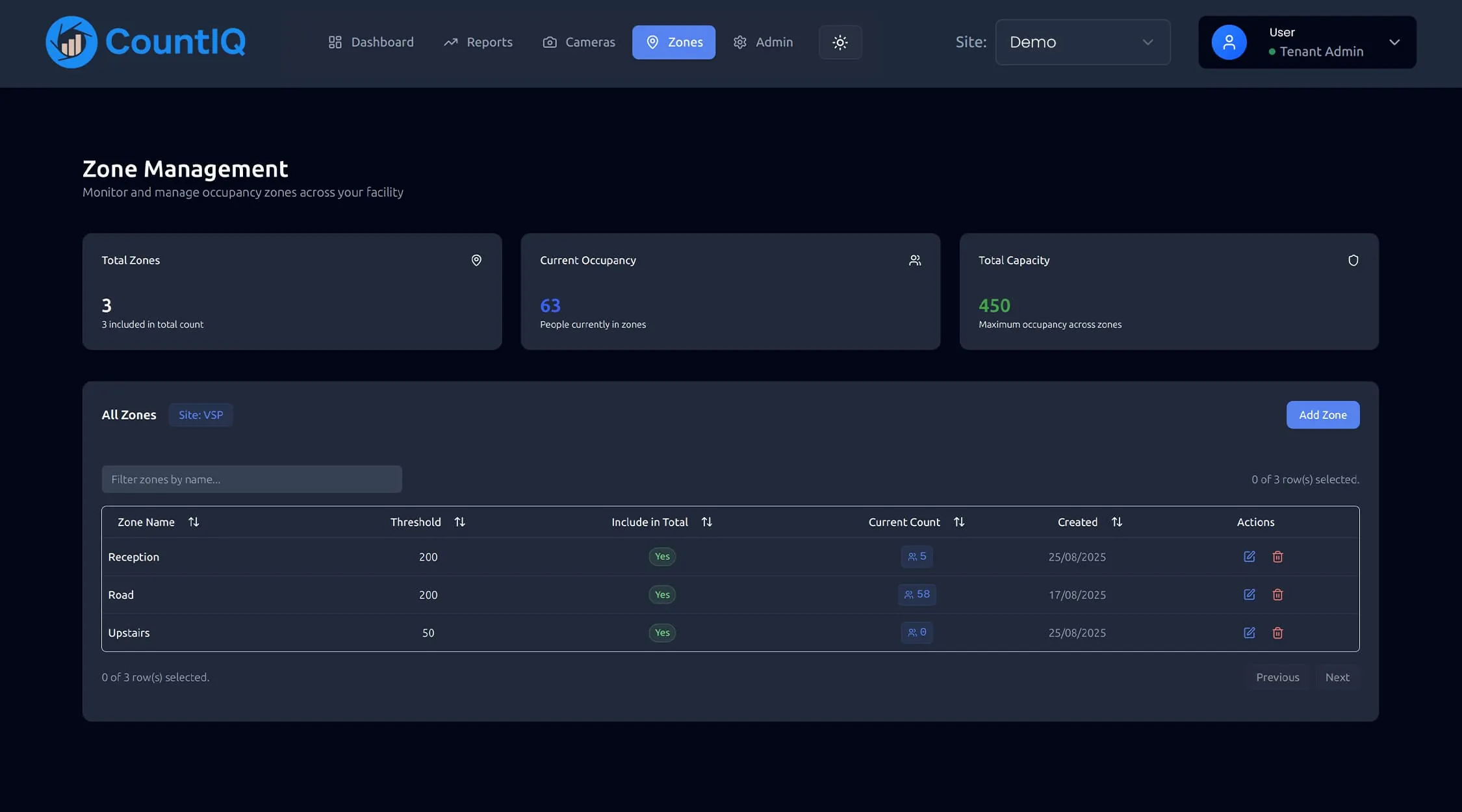
Workplace occupancy monitoring shows how many people are using each floor, entrance and shared space, so you can size and run an office on evidence. CountIQ measures it with compatible Axis cameras and reports occupancy by site and zone.
Why workplaces measure occupancy
Hybrid work changed the numbers
Attendance now varies by day of the week. Occupancy data shows the real peak, which is the figure you have to plan space for.
Lease decisions need evidence
Giving back a floor, subletting or consolidating is a multi-year decision. Months of occupancy history make the case either way.
Services can follow people
Cleaning, catering and front-of-house cover can be scheduled around the days and areas that are actually used.
What to measure
Utilisation is occupancy divided by capacity. These are the views of it that drive workplace decisions.
| Metric | What it tells you | Decision it supports |
|---|---|---|
| Peak occupancy by day | The busiest the office gets | How much space you need |
| Average and peak utilisation | How much of the space is in use | Consolidation and sublease |
| Occupancy by floor or zone | Which areas fill up and which stay empty | Neighbourhood planning |
| Entries by hour | Arrival and departure patterns | Reception, lifts and security cover |
| Day-of-week pattern | Midweek peaks against quiet days | Anchor-day policy and services |
How CountIQ counts
- Step 1
Count at the entrance
Compatible Axis cameras count people crossing configured entrance and exit lines. Detection and counting run on the camera.
- Step 2
Bring every site together
Count data is sent to CountIQ in the cloud, where dashboards show activity and occupancy by site and zone.
- Step 3
Alert and report
Set occupancy thresholds, receive alerts and schedule reports so the right people get the numbers without asking.
Read more about how people counting systems work or see the CountIQ people counting software in detail. Planning a purchase? See people counting pricing, Axis camera compatibility and privacy.
How workplace teams use it
Ahead of a lease event
Review historical occupancy trends for each floor to support a space utilisation review before you renew, expand or hand space back.
A limit on a floor or shared space
Set an occupancy threshold for a zone and have CountIQ alert the facilities team when it is reached.
Comparing offices
See occupancy across several offices in one dashboard and compare how each site is used.
What to check before you start
- Counting is by entrance or zone boundary, not by desk. If you need desk-level or meeting-room-level data, that calls for a different kind of sensor.
- Each floor or zone you want reported needs every way in and out counted: doors, lift lobbies and stairs.
- Occupancy is calculated from entries and exits, so results depend on camera coverage and the counting configuration at each entrance.
- Cameras need to be compatible Axis models running AXIS People Counter or AXIS Object Analytics. We check your existing cameras and entrance coverage before you commit.
Common questions
What is workplace occupancy monitoring?
Workplace occupancy monitoring measures how many people are in an office, floor or zone over time. Facilities and workplace teams use it to understand space utilisation, plan for hybrid attendance and make decisions about how much space they need.
How is this different from access card data?
Access card systems record a swipe at controlled doors, usually on the way in only, and miss people who follow someone through. Count-based occupancy measures movement in both directions at any counted doorway, whether or not it has a card reader.
Does it identify individual employees?
CountIQ works with counts. The camera counts people crossing a configured line and sends count data to CountIQ, and dashboards and reports show numbers by site and zone.
Can it work on a private camera network?
Network access, reporting intervals and any requirements for a private camera network are assessed during setup so the connection fits your site. CountIQ has been deployed across four public hospitals whose cameras sit on private networks, using a dedicated proxy server.
People counting for other spaces
People counting in the field
See how operations teams use CountIQ to turn the cameras they already have into reliable counts.

Ready to Start Your Automation Journey?
Our team is ready to discuss how our AI solutions can address your specific business challenges.
sales@ddilabs.ai
Location
Sydney, Melbourne, Brisbane