
People counting for venues
People counting for venues and events
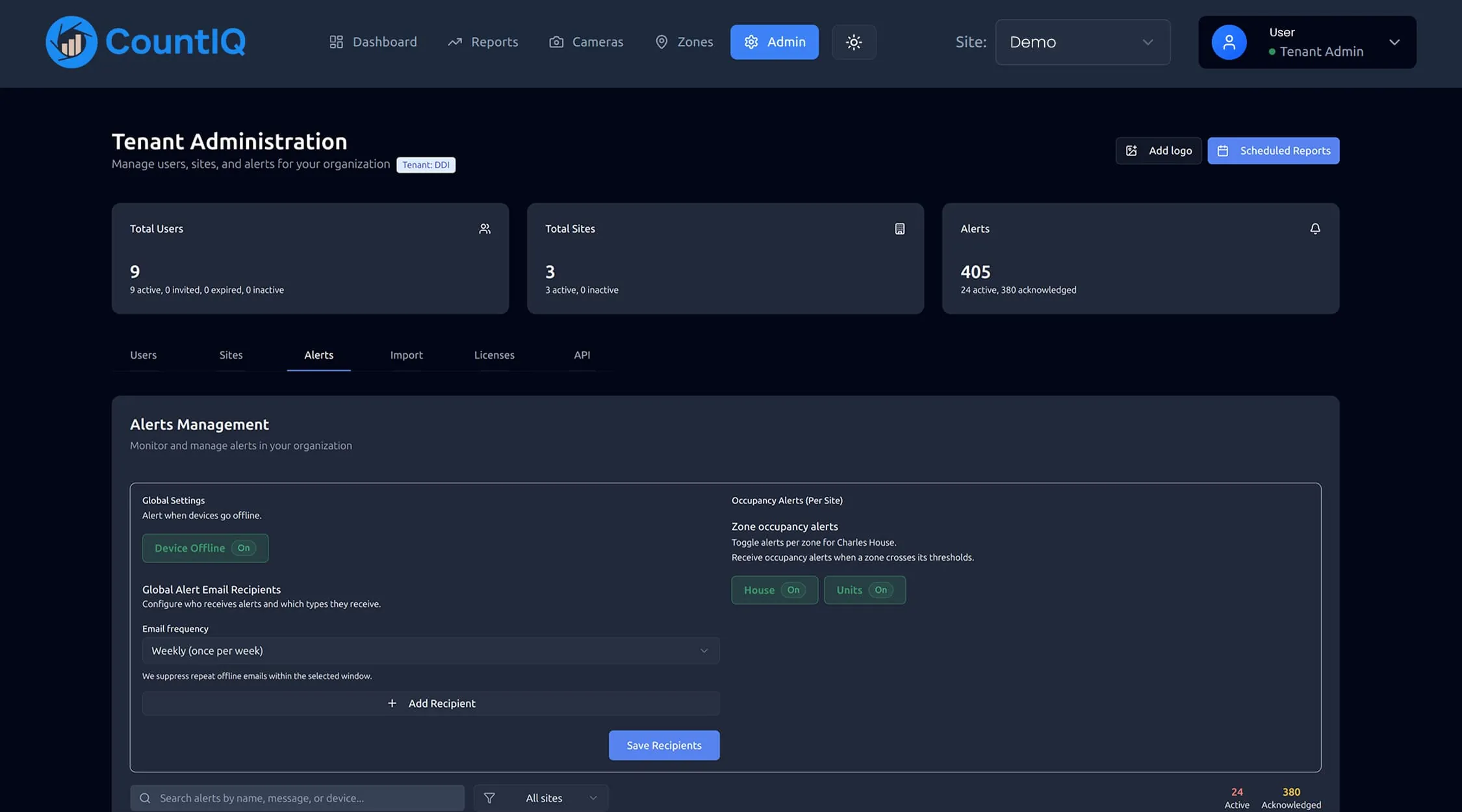
People counting for venues tracks how many people are inside each area in real time, so operators can manage capacity, staff the busy periods and report attendance afterwards. CountIQ calculates live occupancy from compatible Axis cameras at entrances and alerts your team when a threshold is reached.
Why venues count people
Capacity is a condition of operating
Venues run under capacity limits. Live occupancy by area replaces clickers at the door and gives everyone the same number.
Staff where the crowd is
Arrival patterns show when doors, bars, security and cleaning need the most cover.
Attendance for the report afterwards
Entry counts give an attendance figure for each event, including free events with no ticket data.
What to measure
During an event the live numbers matter. Afterwards, the history does.
| Metric | What it tells you | Decision it supports |
|---|---|---|
| Live occupancy by area | How many people are inside now | Door control and capacity |
| Threshold alerts | When an area is nearing its limit | Redirecting people and opening overflow |
| Arrivals by time | When the crowd comes in | Door and security staffing |
| Attendance by event | Total entries for each event | Reporting to clients and promoters |
| Area comparison | Which spaces people use | Layout and future bookings |
How CountIQ counts
- Step 1
Count at the entrance
Compatible Axis cameras count people crossing configured entrance and exit lines. Detection and counting run on the camera.
- Step 2
Bring every site together
Count data is sent to CountIQ in the cloud, where dashboards show activity and occupancy by site and zone.
- Step 3
Alert and report
Set occupancy thresholds, receive alerts and schedule reports so the right people get the numbers without asking.
Read more about how people counting systems work or see the CountIQ people counting software in detail. Planning a purchase? See people counting pricing, Axis camera compatibility and privacy.
How venue teams use it
A limit on each area
Define the occupancy thresholds that matter for each space. CountIQ evaluates incoming counts against them and triggers the configured alerts when limits are reached.
Guest arrivals and departures
Hospitality venues track arrivals, departures and occupancy to plan staffing and manage busy periods.
Comparing events
Review attendance patterns across events and compare visitor activity between monitored areas.
What to check before you start
- Live occupancy depends on every entrance and exit being counted, including doors that are only used for egress.
- Wide gates and crowds moving in both directions are the hardest conditions to count. Camera position matters more here than anywhere else.
- Counting relies on installed cameras, so it suits permanent venues better than temporary sites.
- CountIQ supports capacity management. It does not replace your crowd management plan or the people responsible for it.
- Cameras need to be compatible Axis models running AXIS People Counter or AXIS Object Analytics. We check your existing cameras and entrance coverage before you commit.
Common questions
How do venues monitor occupancy in real time?
Cameras at each entrance and exit count people in both directions. Occupancy is the running total of entries minus exits for each area, shown on a live dashboard with alerts when a set threshold is reached.
Can we set different limits for different areas?
Yes. Teams configure occupancy thresholds for the sites or zones they want to monitor, and CountIQ evaluates incoming counts against each one.
What happens when a limit is reached?
CountIQ triggers the alerts you have configured for that threshold. Live dashboards give the team the context to respond.
Can it report attendance for free events?
Yes. Entry counts give an attendance figure whether or not the event is ticketed. For ticketed events, counts show how many ticket holders actually attended and when they arrived.
People counting for other spaces
People counting in the field
See how operations teams use CountIQ to turn the cameras they already have into reliable counts.

Ready to Start Your Automation Journey?
Our team is ready to discuss how our AI solutions can address your specific business challenges.
sales@ddilabs.ai
Location
Sydney, Melbourne, Brisbane